
Learn how to build an AI workflow with this comprehensive guide. Discover tools, best practices, automation strategies, use cases, challenges, and future trends.
Introduction
Artificial intelligence has transformed the way businesses automate repetitive tasks, analyze data, and make smarter decisions. From customer service chatbots to predictive analytics and intelligent cybersecurity systems, AI workflows have become the foundation of modern digital transformation.
If you’re wondering how to build an AI workflow, you’re not alone. Organizations of every size are looking for practical ways to integrate AI into their daily operations without unnecessary complexity. A well-designed AI workflow can reduce manual work, improve efficiency, increase accuracy, and help teams focus on high-value activities.
Whether you’re a developer, business owner, IT professional, or someone exploring AI automation for the first time, this guide explains everything you need to know. You’ll learn the essential components of an AI workflow, how to build one step by step, which tools to use, common challenges, best practices, real-world examples, and emerging industry trends.
What Is an AI Workflow?
An AI workflow is a structured sequence of automated processes where artificial intelligence models perform specific tasks to achieve a business objective. Instead of requiring human intervention at every stage, AI workflows analyze data, make decisions, generate outputs, and trigger additional actions automatically.
Unlike traditional automation, AI workflows can learn from data, recognize patterns, understand language, and improve over time.
Examples include:
- AI customer support assistants
- Fraud detection systems
- Email classification
- Predictive maintenance
- Document processing
- AI cybersecurity monitoring
- Marketing personalization
- Content generation
At its core, every AI workflow follows a logical process:
- Collect data
- Process information
- Analyze using AI
- Generate decisions
- Execute actions
- Monitor results
- Improve continuously
Why AI Workflows Matter
Businesses are under constant pressure to improve productivity while reducing operational costs.
AI workflows help organizations by:
- Eliminating repetitive manual work
- Increasing operational efficiency
- Reducing human errors
- Improving decision-making
- Delivering faster customer responses
- Processing large datasets in real time
- Scaling business operations
According to industry research, organizations adopting AI-powered automation often experience significant improvements in productivity, customer satisfaction, and operational efficiency.
Key Components of an AI Workflow
Understanding the building blocks makes it easier to design effective AI automation.
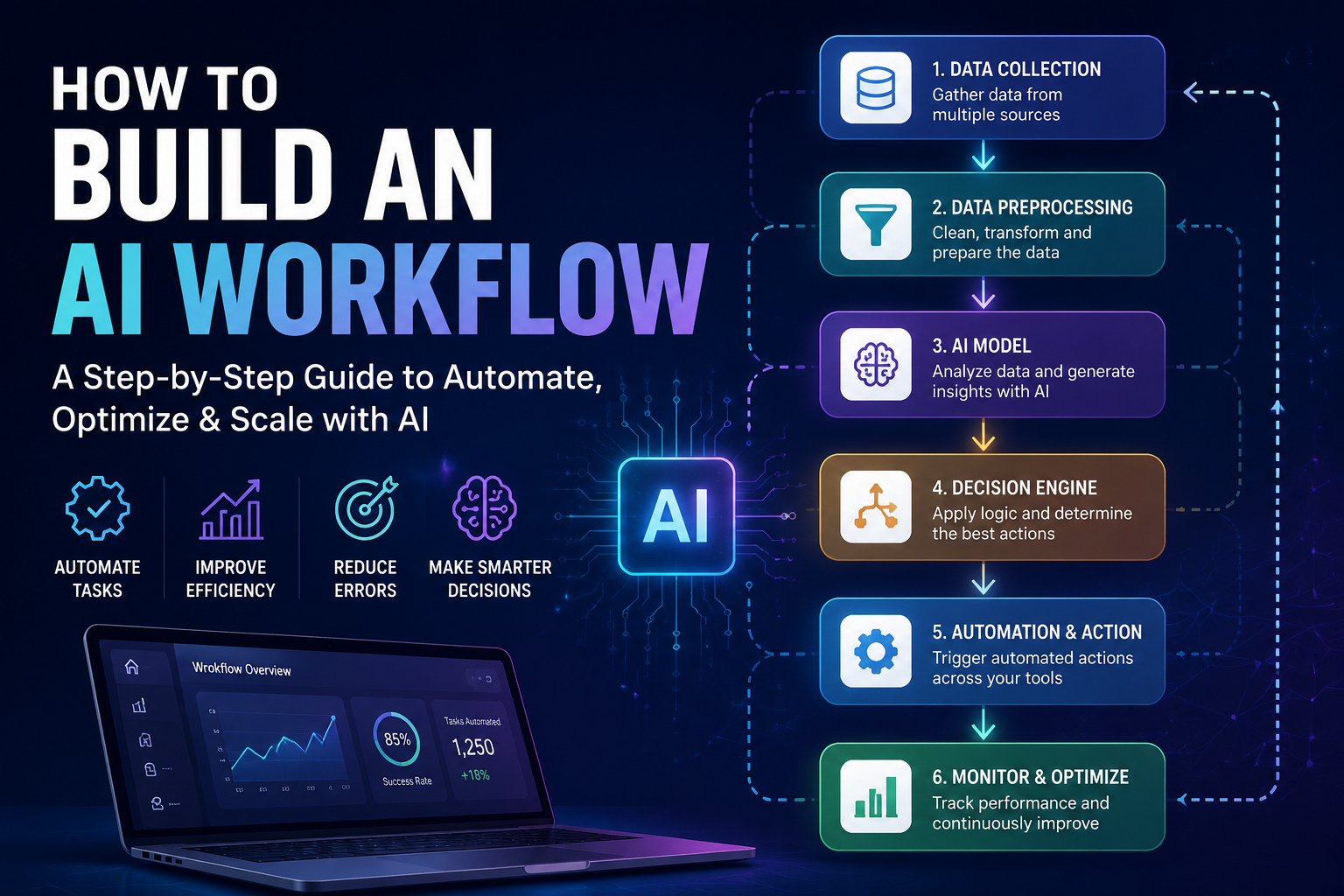
1. Data Collection
Every AI workflow begins with data.
Sources include:
- Databases
- APIs
- CRM systems
- ERP software
- IoT devices
- Customer interactions
- Emails
- Documents
- Social media
The quality of your AI workflow depends heavily on the quality of your data.
2. Data Preparation
Raw data often contains errors, duplicates, or missing values.
Common preprocessing tasks include:
- Cleaning data
- Removing duplicates
- Standardizing formats
- Filling missing values
- Feature engineering
- Labeling datasets
Clean data produces better AI predictions.
3. AI Model Selection
Different AI problems require different models.
Examples include:
| AI Task | Recommended Model |
|---|---|
| Image recognition | Computer Vision |
| Text generation | Large Language Models (LLMs) |
| Recommendations | Machine Learning |
| Forecasting | Predictive Analytics |
| Speech recognition | Deep Learning |
| Fraud detection | Anomaly Detection |
Choosing the correct model directly affects workflow performance.
4. Decision Engine
After processing information, AI decides what action should happen next.
Examples include:
- Approve transactions
- Flag suspicious activity
- Generate reports
- Respond to customer inquiries
- Route support tickets
- Recommend products
Decision logic combines AI predictions with predefined business rules.
5. Automation Layer
The automation layer connects AI outputs with other software.
Examples:
- CRM updates
- Slack notifications
- Email automation
- Database updates
- Cloud storage
- Workflow orchestration
Popular automation platforms include:
- Zapier
- Make
- Microsoft Power Automate
- n8n
- Apache Airflow
6. Monitoring and Optimization
AI workflows require continuous monitoring.
Key performance indicators include:
- Accuracy
- Response time
- Error rates
- Automation percentage
- Customer satisfaction
- Cost savings
- Processing speed
Continuous improvement ensures long-term success.
Step-by-Step Guide: How to Build an AI Workflow
Step 1: Define Your Business Goal
Start with a clear objective.
Examples include:
- Automate invoice processing
- Detect cybersecurity threats
- Improve customer support
- Generate marketing content
- Analyze sales trends
Avoid implementing AI without solving a specific business problem.
Step 2: Map Your Existing Process
Document every step of your current workflow.
Identify:
- Manual tasks
- Bottlenecks
- Delays
- Decision points
- Data sources
Process mapping helps determine where AI adds the most value.
Step 3: Collect High-Quality Data
Gather historical and real-time data relevant to your objective.
For example:
Customer support AI may require:
- Chat history
- FAQs
- Product documentation
- Customer profiles
- Support tickets
Quality data improves AI accuracy.
Step 4: Select the Right AI Technology
Different workflows require different technologies.
Examples:
- ChatGPT for text generation
- Computer Vision for image analysis
- NLP for language understanding
- Predictive analytics for forecasting
- Recommendation engines for personalization
Choose technology based on business needs rather than popularity.
Step 5: Build the Workflow Logic
Design how information moves through the system.
Example workflow:
Customer Email →
AI Classifies Request →
Priority Assigned →
Auto Response Generated →
Complex Cases Sent to Human →
CRM Updated →
Analytics Dashboard Updated
Simple workflows often outperform overly complex designs.
Step 6: Integrate Existing Systems
AI should work with existing business tools.
Common integrations include:
- Salesforce
- HubSpot
- Microsoft 365
- Google Workspace
- AWS
- Azure
- Slack
- Jira
- ServiceNow
Seamless integration minimizes disruption.
Step 7: Test Before Deployment
Validate:
- AI accuracy
- Speed
- Security
- Reliability
- Edge cases
- Error handling
Pilot deployments reduce implementation risks.
Step 8: Monitor Performance
Measure:
- Processing time
- Accuracy
- ROI
- User adoption
- Customer satisfaction
- Cost reduction
Optimization should be continuous.
Popular AI Workflow Tools
Several platforms simplify AI workflow creation.
| Tool | Best For | Skill Level |
|---|---|---|
| Zapier AI | Business automation | Beginner |
| Make | Visual workflows | Beginner |
| n8n | Open-source automation | Intermediate |
| Apache Airflow | Data engineering | Advanced |
| LangChain | LLM applications | Advanced |
| Microsoft Power Automate | Enterprise automation | Intermediate |
| UiPath | Robotic Process Automation | Enterprise |
Real-World AI Workflow Examples
Customer Support
Workflow:
Customer submits ticket →
AI categorizes issue →
Knowledge base searched →
Response generated →
Escalation if necessary
Result:
- Faster responses
- Lower support costs
- Improved customer satisfaction
AI Cybersecurity
Workflow:
Network logs collected →
AI analyzes behavior →
Threat detected →
Alert generated →
Security team notified →
Automatic response initiated
Benefits include:
- Real-time detection
- Faster incident response
- Reduced false positives
Healthcare
AI workflows assist by:
- Scheduling appointments
- Diagnosing medical images
- Predicting patient risks
- Managing electronic health records
Manufacturing
Factories use AI workflows for:
- Predictive maintenance
- Quality inspection
- Supply chain optimization
- Inventory forecasting
AI Workflow vs Traditional Automation
| Feature | Traditional Automation | AI Workflow |
|---|---|---|
| Rules | Fixed | Adaptive |
| Learning | No | Yes |
| Decision Making | Rule-based | Data-driven |
| Flexibility | Limited | High |
| Accuracy | Moderate | High |
| Continuous Improvement | No | Yes |
Best Practices for Building AI Workflows
Start Small
Automate one business process before scaling.
Focus on Data Quality
Poor data leads to poor AI performance.
Keep Humans in the Loop
Critical decisions should include human oversight.
Prioritize Security
Protect sensitive data using encryption, authentication, and access controls.
Measure ROI
Track improvements using measurable business metrics.
Continuously Improve
AI models should be retrained as business conditions change.
Benefits
Implementing AI workflows offers numerous advantages:
- Increased productivity
- Reduced operational costs
- Faster processing times
- Better customer experiences
- Improved decision-making
- Higher accuracy
- 24/7 automation
- Scalable operations
- Better cybersecurity monitoring
- Improved compliance
Challenges and Limitations
Although AI workflows provide significant benefits, they also present several challenges.
Data Quality Issues
Incomplete or biased datasets reduce AI accuracy.
High Initial Costs
Implementation may require investment in infrastructure, software, and expertise.
Integration Complexity
Legacy systems can complicate AI deployment.
Security Risks
Poorly secured AI workflows may expose sensitive information.
Regulatory Compliance
Organizations must comply with privacy regulations such as GDPR and industry-specific standards.
Model Drift
AI performance may decline over time as real-world data changes.
Future Trends
AI workflow technology continues to evolve rapidly.
Emerging trends include:
Autonomous AI Agents
AI systems capable of independently completing complex multi-step tasks.
Generative AI Integration
Organizations increasingly combine large language models with workflow automation.
AI Copilots
AI assistants supporting employees across sales, development, cybersecurity, and operations.
Hyperautomation
Businesses combine AI, robotic process automation, analytics, and cloud technologies into unified workflows.
Explainable AI
Organizations demand greater transparency in AI decision-making.
AI Cybersecurity Automation
Security operations increasingly rely on AI to detect and respond to threats in real time.
Expert Insights
Successful AI workflows are not built by simply adding artificial intelligence to existing processes. Instead, organizations that achieve the best outcomes first simplify their workflows, ensure high-quality data, and clearly define success metrics. AI should complement human expertise, especially in high-stakes scenarios such as healthcare, finance, and cybersecurity.
Industry trends also show growing investment in AI news platforms and automation technologies, as businesses seek faster access to insights and more adaptive operational processes.
Read More About:Best AI Agents for Small Businesses: Top AI Tools for Growth in 2026
Frequently Asked Questions (FAQ)
1. What is an AI workflow?
An AI workflow is an automated process where artificial intelligence analyzes data, makes decisions, and performs tasks with minimal human intervention.
2. Do I need programming skills to build an AI workflow?
Not necessarily. No-code and low-code platforms like Zapier, Make, and Microsoft Power Automate allow beginners to create AI-powered workflows without extensive coding knowledge. More advanced applications may require programming.
3. What industries benefit the most from AI workflows?
Industries such as healthcare, finance, manufacturing, retail, cybersecurity, education, logistics, and customer service all benefit significantly from AI workflow automation.
4. How can businesses measure AI workflow success?
Common metrics include reduced processing time, lower operational costs, improved accuracy, increased customer satisfaction, automation rate, and return on investment (ROI).
5. What are the biggest challenges when implementing AI workflows?
The most common challenges are poor data quality, integration with legacy systems, high initial costs, security concerns, compliance requirements, and maintaining AI model performance over time.
6. Can small businesses benefit from AI workflows?
Yes. Small businesses can automate customer support, email marketing, invoicing, scheduling, and other routine tasks using affordable AI and no-code automation platforms.
7. How do AI workflows differ from robotic process automation (RPA)?
Traditional RPA follows predefined rules to automate repetitive tasks, while AI workflows can interpret unstructured data, learn from patterns, and make context-aware decisions, making them more flexible and intelligent.
Conclusion
Understanding how to build an AI workflow is becoming an essential skill for organizations seeking to improve efficiency, reduce costs, and remain competitive in an AI-driven economy. The most effective workflows begin with clearly defined objectives, rely on high-quality data, and combine intelligent models with thoughtful automation and continuous monitoring.
Whether you’re automating customer support, strengthening cybersecurity operations, streamlining business processes, or building AI-powered applications, success depends on careful planning, selecting the right tools, and continuously refining performance. As technologies such as generative AI, autonomous agents, and hyperautomation mature, AI workflows will become even more capable and accessible, creating new opportunities across every industry.
Key Takeaways
- AI workflows automate complex business processes using intelligent decision-making.
- High-quality data is the foundation of every successful AI workflow.
- Start with a clearly defined business objective before selecting AI tools.
- AI workflows combine data collection, preprocessing, model inference, automation, and monitoring.
- No-code platforms make AI workflow creation accessible to non-developers.
- Human oversight remains essential for critical decisions and compliance.
- Continuous monitoring and model updates improve long-term performance.
- AI workflows can significantly increase productivity, reduce costs, and enhance customer experiences.
- Emerging trends such as generative AI, autonomous agents, and hyperautomation will further transform workflow automation.
- Businesses that prioritize security, governance, and measurable outcomes are best positioned to maximize the value of AI workflow automation.